
Delivery route planning decides the stop order and courier allocation before navigation starts. For a small business, the practical workflow is to upload the address list, review the proposed routes and give each driver a Google Maps link. See the Excel and CSV workflow in the actual MileCut planner.
Google Maps can guide a courier through unfamiliar streets. It cannot recover the margin already lost when the delivery list crosses the same district twice, sends two vans into the same area or leaves a compatible order for a second journey.
Google's current consumer help page allows up to nine stops, including the final destination. It tells the user to drag destinations to change their order. That small instruction places a large economic decision in the owner's hands: who decided the order before the driver pressed Start?
A route has two jobs
Before departure, the business must decide which addresses belong together, which courier receives them, which stop comes first and whether the total plan fits the working day. During the journey, navigation guides the driver from the current location to the next destination.
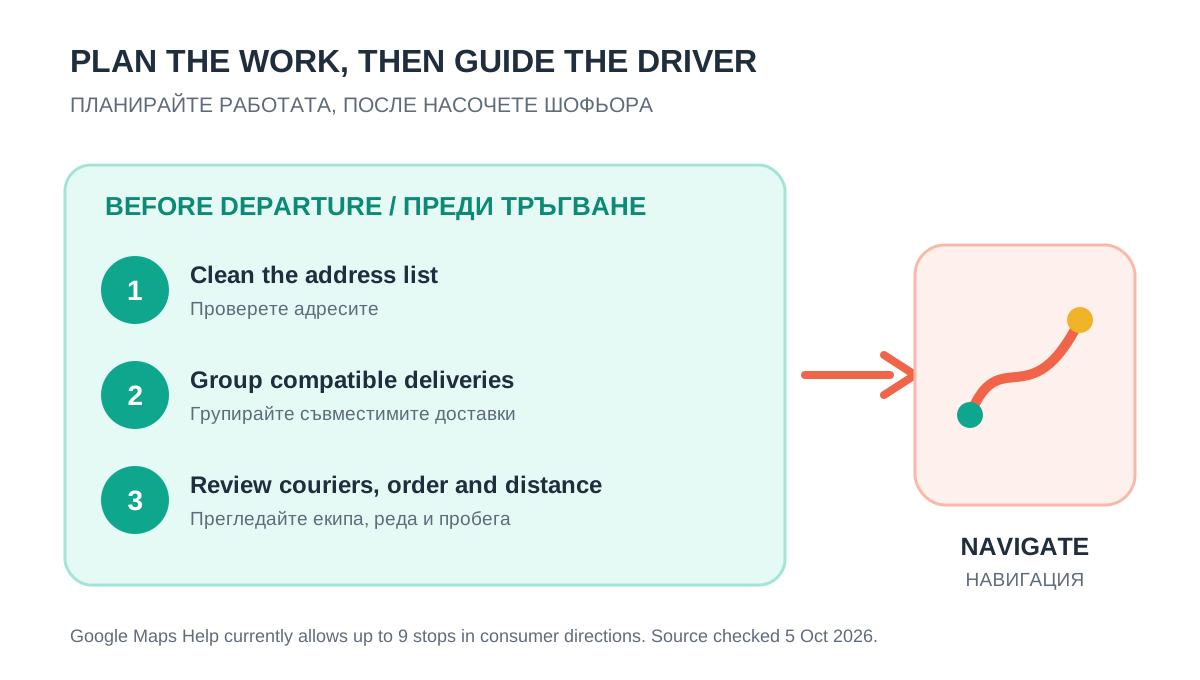
| Decision | Before departure | On the road |
|---|---|---|
| Clean and confirm addresses | Owner or dispatcher | Use the confirmed destination |
| Group compatible deliveries | Owner or planning tool | Follow the assigned route |
| Assign work between couriers | Owner or planning tool | Each courier opens their route |
| Choose the stop sequence | Review before dispatch | Navigate between stops |
| React to signs and conditions | Check known restrictions | Driver judgement remains essential |
Google's own product structure reflects this separation. Its Route Optimization API describes shipment assignment, visit sequences, vehicle capacity, driver hours, time windows, distance, duration and cost. Google announced two long-running optimization endpoints as generally available on 30 September 2026. This is useful market context: planning is a distinct operational problem even when Google Maps remains the familiar navigation surface.
A twelve-kilometre ordering mistake costs €2.31 today
The latest European Commission workbook available on 5 October reports Bulgarian automotive diesel at €1.9277 per litre for 28 September 2026. For an illustrative van using 10 l/100 km:
direct fuel cost per km = €1.9277 × 10 ÷ 100 = €0.19277
12 unnecessary km × €0.19277 = €2.31
Repeat that loop across 22 comparable delivery days and direct diesel reaches €50.89. Paid driver time, tyres, servicing and depreciation sit outside this fuel-only calculation. They can make the operating loss larger.
The same mistake became 28.7% more expensive in eleven weeks
The Commission's history workbook reports €1.4977 per litre on 13 July and €1.9277 on 28 September. That is a 28.7% increase across twelve weekly observations. The same 12 unnecessary kilometres moved from €1.80 to €2.31 in direct diesel cost.
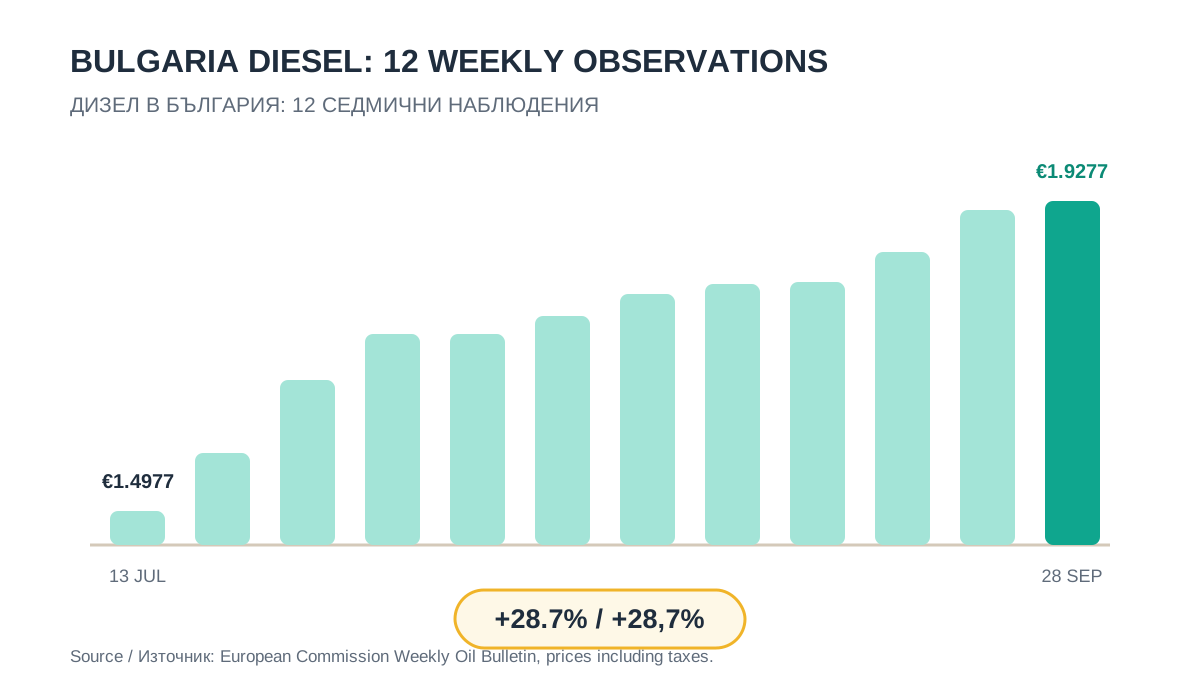
A small company cannot set the national diesel price. It can update the price in its route-cost calculation, compare planned kilometres before dispatch and record the distance actually driven. That turns a volatile market number into a weekly operating control.
More deliveries can improve the economics when they fit
Route density matters as much as route length. Consider an 80 km route completing eight deliveries. At the stated inputs, direct diesel is €15.42, or €1.93 per delivery. A second plan completes ten compatible deliveries across 86 km. Total fuel rises to €16.58, while fuel per completed delivery falls to €1.66.
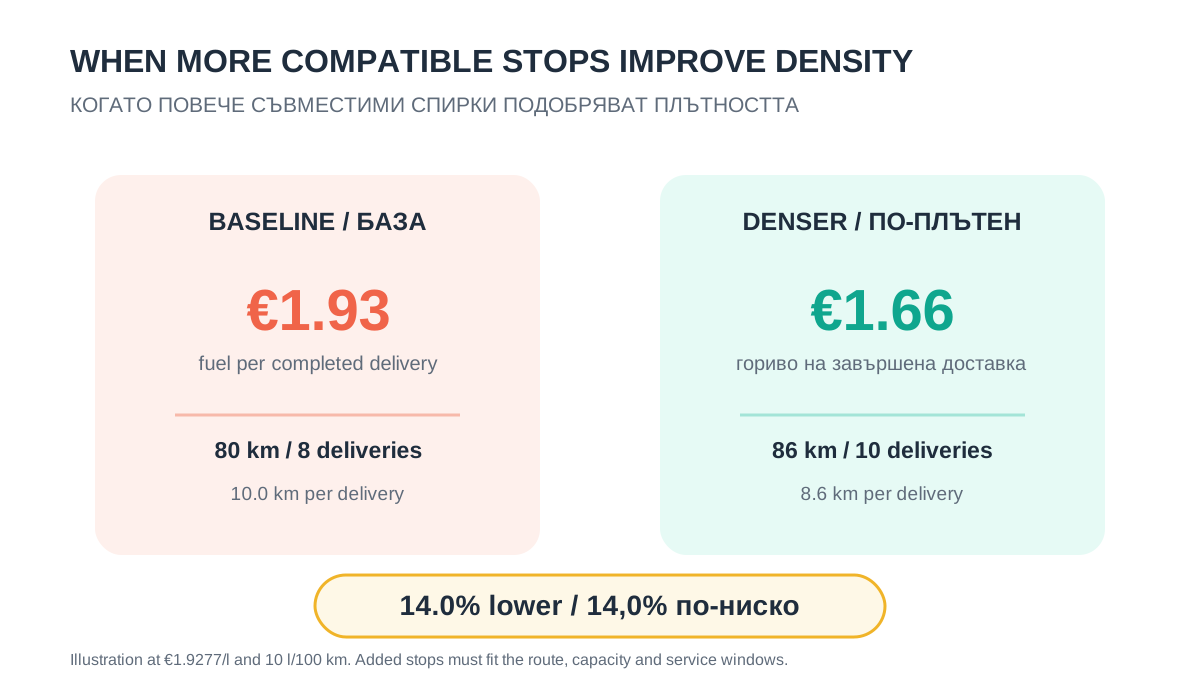
The extra stops must be geographically compatible, inside vehicle capacity and achievable within customer windows. A dense route that causes late or failed deliveries creates a different cost problem. Use actual completed deliveries in the denominator.
A five-minute owner check before every dispatch
- Count the work. Record addresses, parcels, service time, priorities and promised windows.
- Clean the list. Remove duplicates and confirm incomplete or ambiguous addresses before the route is created.
- Group compatible stops. Keep nearby work together when capacity, timing and loading order allow it.
- Compare the whole plan. Review every courier, the return to base and the total planned kilometres. A shorter-looking segment can hide a longer day.
- Calculate exposure. Multiply avoidable kilometres by the company's current fuel cost per kilometre. Add driver time and variable vehicle cost when reliable records exist.
- Send the reviewed route. Give each courier the correct navigation link, then record actual distance and completed stops after the run.
Where MileCut fits
MileCut starts with the delivery list the business already uses. Upload Excel or CSV addresses, check the pins, choose one to five couriers, review the proposed allocation and stop order, and compare the plan before creating routes. Team and Control allow stops to be moved between couriers and reordered. Control adds a point-in-time traffic check for planned ETA, distance and courier recommendation.
Each courier then receives a separate Google Maps link. MileCut does the preparation and review; Google Maps provides familiar navigation. Continuous GPS tracking and automatic re-planning during the shift remain outside the current product.
The useful weekly measures are planned kilometres, actual kilometres, completed deliveries, kilometres per completed delivery and route cost per completed delivery. If the plan removes 12 excessive kilometres, the fuel saving is immediate and auditable. If compatible deliveries increase faster than route distance, the cost per completed stop can fall as well.
Sources and limits: Google Maps Help: directions and multiple stops, Google Maps Platform: Route Optimization overview, Google Maps Platform: Route Optimization release notes, European Commission Weekly Oil Bulletin. Google product capabilities were checked on 5 October 2026. Fuel calculations use a national average and 10 l/100 km. Actual routes, prices and consumption vary. No fixed saving is promised.
Decide the route before the courier opens navigation.
Upload the next delivery list, review the stop order and compare the planned kilometres.